Swap the outfit or the background. Keep the person.
A new outfit, a new location, studio lighting — while the face, the movement and the camera stay exactly as you shot them. Seedance 2.5, three steps.
How to do it
- Your real video, 4–30 secondsThe person is clearly visible and not too far from the camera.
- A reference photoAn example: “this outfit” or “this place.”
- Access to Seedance 2.5The AI model that edits the video. Where to run it ↓
ChatGPT or Claude writes the prompt for you — the free versions work too.
-
Take a screenshot of a frame
From your video — a frame where the person and the scene are clearly visible.
-
Send 3 files and a request to ChatGPT or Claude
Open a new chat and upload the files in this order:
- Prompt Engine (PDF)
- Reference photo
- Video screenshot
Copy the request, replace the text in [brackets] and send it:
Read the attached Seedance 2.5 instructions and follow them exactly. Write a ready-to-use prompt. @Image1 — the reference photo, the first image. Use it for: [the outfit / the background / both]. What it shows: [a woman wrapped in a blanket, in the mountains]. @Video1 — the source video; the second image is a screenshot of one of its frames. Follow the format and rules in the instructions.Two references?
Upload them in order, with the screenshot last. The middle lines of the request become:
@Image1 — the reference photo, the first image. Use it for: the outfit only. What it shows: […]. @Image2 — the reference photo, the second image. Use it for: the background only. What it shows: […]. @Video1 — the source video; the third image is a screenshot of one of its frames.That's four files — free ChatGPT may not have enough uploads left, so Claude is easier.
-
Paste the finished prompt into Seedance
You'll get a ready-to-use prompt in English plus a short breakdown in the language you wrote in. In Seedance, upload your original video and the reference photo, paste in the prompt and hit generate. Where to run it ↓
Don't upload the Prompt Engine or the screenshot to Seedance — they're only for the chat.
The Prompt Engine is a PDF for ChatGPT or Claude. It looks at your frame and your reference and writes a detailed prompt that protects the face, the movement and the camera. What's inside ↓
Get the Prompt Engine · $7For simple edits: one item or one location.
-
Find a reference photo
A photo of the outfit or the place you want. The sharper the photo, the more accurate the result; the outfit should be fully visible.
Tip: you can generate the reference
Take a screenshot of a frame from your video and ask ChatGPT Images or Nano Banana to change the outfit or the background. A reference like this works especially well: the pose and the angle already match your video.
If the face comes out a little different, that's fine — Seedance takes the face from your original video.
-
Fill in the prompt template
Copy it and replace the text in [brackets]. Keep the prompt in English — it's more reliable.
@Video1 is the original video. Keep the person exactly the same: face, hair, body, hands, movements, facial expressions and timing. @Image1 is the reference for [the outfit / the location / the outfit and the location]. Do not copy the person from @Image1. Change only: [her dress to the dress from @Image1]. Details: [dark blue fitted mini dress, sleeveless, high neckline]. Keep everything else unchanged. Keep the camera angle and camera movement the same as in @Video1. Match the light on the person to the new scene. Realistic result, no distortions.What's what
@Video1is your video,@Image1is the first photo you upload,@Image2the second.the outfit / the location…— pick what you're changing: the outfit, the location, or both.Change only— what to change, in one sentence.Details— be specific: color, fabric, cut, the place itself. The AI doesn't treat “beautiful” as an instruction.
Two references?
Replace the
@Image1line with these two:@Image1 is the reference for the outfit only. @Image2 is the reference for the location only. -
Run Seedance
Upload the video and the photos in the same order as in the prompt, paste in the prompt and hit generate. Where to run it ↓
In complex scenes — two people, a new location, water, wind — a simple template is sometimes not enough, and the face or the movement may drift. That's where helps.
Where to run Seedance 2.5
Any of these platforms works — the steps are the same. Every run costs money, so it's easiest to do your first tests on a short video.
Segmind
The lowest generation prices. As a rough guide, 30 seconds of 720p video costs about $7.
Open Segmind ↗Syntx bot
If you'd rather do it right in Telegram: send the video and photos to the bot and paste in the prompt.
Open the bot ↗Syntx website
The same as the bot, in your browser — if you'd rather skip Telegram.
Open Syntx ↗Platform prices change. The Syntx links are affiliate links.
If the result isn't right
The face or the movement changed
Check that the prompt has the lines about what to keep, and that the photo has a role: @Image1 is the reference for the outfit — not “make it look like the photo.”
The outfit or the place doesn't match
Be more specific: color, fabric, cut, what's around. Words like “beautiful” and “cinematic” aren't instructions.
What changes and what stays
Seedance changes only what you asked for — as long as the prompt says explicitly what to keep. The template and the Prompt Engine already do.
CHANGE
- outfit
- location & background
- light & mood
- details: glasses, jewelry, a bag
- camera angle — only on request
KEEP
- face
- hair
- body & proportions
- hands
- movement & gestures
- facial expressions
- composition
- camera
- timing
It's for you if you film at home but want a studio look, or want a new look without reshooting.
Why the Prompt Engine, if there's a template?
For simple edits, the template is enough. But in a complex scene the result depends on details that are easy to miss — and every failed generation costs money.
Writing it yourself, you have to think through
- the outfit: fabric, cut, color, texture;
- the new place: foreground, middle ground, background;
- light on the person and on the background, so they match;
- how fabric, water and leaves move;
- what to rule out so distortions don't appear.
The Prompt Engine does it for you
- looks at your frame and reference and describes the outfit and the place precisely;
- gives every file a clear role, so Seedance never mixes them up;
- matches light and shadows to the new place;
- adds natural motion to the fabric and the scene;
- protects the face, body, movement and camera.
A real example
One photo for both the outfits and the location. Here's the start of the prompt the Prompt Engine wrote.
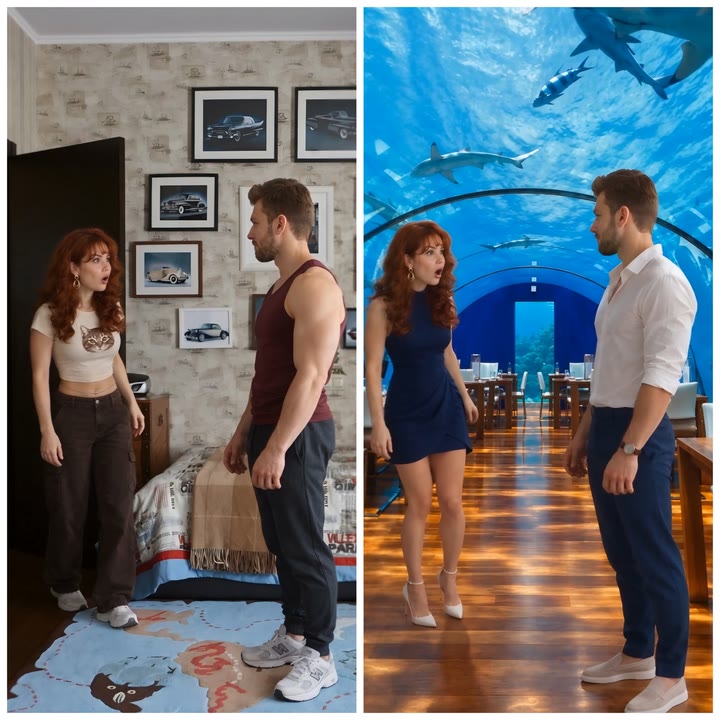
Stop wasting generations on trial and error
One 30-second generation in 720p on Segmind costs about $7 — the same as the Prompt Engine. If it saves you even one failed attempt, it has already paid for itself.
Your purchase includes two files:
- Prompt Engine (PDF)Upload it to ChatGPT or Claude — it writes a ready-to-use Seedance 2.5 prompt.
- Examples (PDF)Real before-and-after frames, plus what the finished request looks like inside Seedance. For reading only — nothing in it gets uploaded.
2 PDFs in English, delivered instantly via Gumroad. The prompt the Prompt Engine writes works with Seedance 2.5 on any platform.
FAQ
Can I change the outfit in a video without changing the face?
Yes. Upload your original video and a photo of the outfit to Seedance 2.5, and say explicitly in the prompt: take the face, hair, body and movement from the video (@Video1), take only the outfit from the photo (@Image1), and do not copy the person from the photo. The more detailed the prompt, the more reliably the person stays the same.
How long can the video be?
4 to 30 seconds; the result is the same length as the original. Close-ups and full-body shots both work — the person just needs to be clearly visible and not too far from the camera.
How much does one generation cost?
It depends on the platform, the video length and the quality. As a rough guide, 30 seconds of 720p video on Segmind costs about $7; other platforms can cost more, and prices change. Short clips cost less, so they are best for your first tests.
Can I do it all in Telegram?
Yes, Seedance 2.5 is available in the Syntx Telegram bot. The steps are the same: upload the video and the reference photo, then paste in the prompt. Prefer a browser? There's also the Syntx website.
Do I need the Prompt Engine, or can I write the prompt myself?
You don't have to use it. For simple edits — one item or one location — the free template is enough. In complex scenes (several people, a new location, moving water or fabric) the Prompt Engine spells out the details for you and helps you avoid wasting generations on trial and error.
Can I use the Prompt Engine with free ChatGPT or Claude?
Yes. You upload 3 files to the chat: the Prompt Engine, the reference photo and a video screenshot. Free ChatGPT has a daily file-upload limit that usually covers one task. With two references you have four files, so free Claude is easier.